The Ghost in the Refurb: Vetting a Secondhand Laptop Before It Meets Your Data
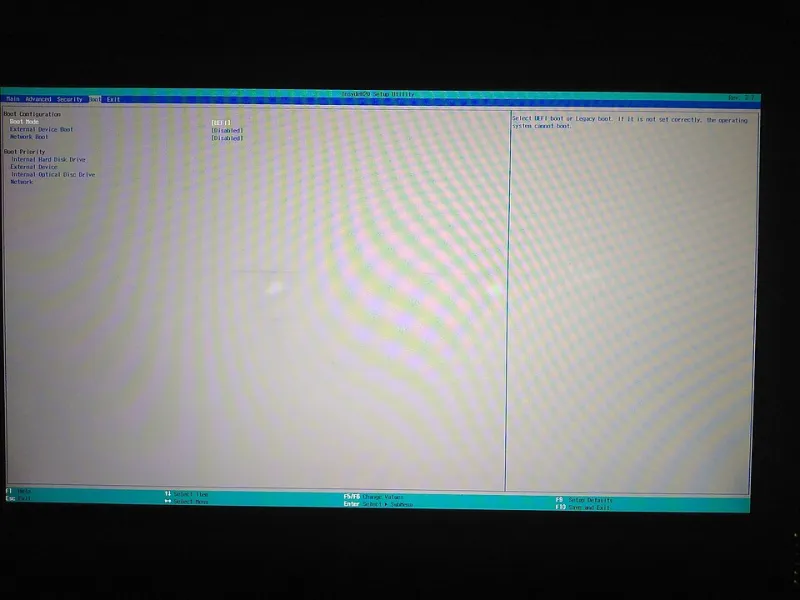
Photo: Rdrg109, CC BY-SA 4.0, via Wikimedia Commons
Secondhand laptops are having a moment. Corporate liquidations, pawn shop shelves, eBay listings, and big-box refurb programs are full of machines that are perfectly capable and dramatically cheaper than new. That is the good news. The bad news is that a laptop can be wiped, reset, and still arrive with someone else's ghost.
The ghost is not usually a virus in the Hollywood sense. It is an enrollment profile, an activation lock, a hidden local account, a stale BIOS, or a pile of preinstalled software that nobody asked for. For a home user, that is annoying. For a small business, a freelancer, or anyone handling client data, it is a trust problem.
What Refurbished Can Hide
The word refurbished means almost nothing on its own. A big-box program may have a real inspection process. An eBay seller may have run a factory reset and called it refurbished. A pawn shop may have no idea what happened before the machine came through the door. Corporate liquidations are often fine, but they are also where managed devices come from, and managed devices can carry management remnants.
The most common leftovers are access work or school accounts, mobile device management enrollment, Windows activation issues, BIOS supervisor passwords, and firmware that has not been updated in years. Less common but more serious are persistence tools such as Absolute Persistence, which can survive a normal operating system reinstall. If you are buying a used business laptop, ask about it.
Before You Pay: Ask for the Right Screens
A serious seller will answer questions and send screenshots. Ask for a photo of the BIOS or UEFI screen showing the firmware version and any password prompt. Ask for the Windows activation status. Ask whether the machine is enrolled in any school or workplace management. Ask whether there is a BIOS password. If the seller dodges those questions, treat that as information.
On eBay, use the platform's buyer protection and pay with a method that offers recourse. In person, meet in a public place and boot the machine before money changes hands. Do not accept a laptop that is already logged into someone else's account just because the desktop looks clean.
The First Boot Checklist
When the machine arrives, do not sign into your Microsoft, Google, or work accounts yet. Treat the first boot as an inspection, not a setup.
Check Settings for Accounts and look for access work or school. Check for enrollment in a mobile device management system. Open the local users list and look for accounts you did not create. On Windows, the netplwiz tool or Computer Management will show local accounts. On a Mac, check Users and Groups. On a Chromebook, check whether the device is enterprise enrolled.
Open the BIOS or UEFI and look for a supervisor password, Secure Boot status, and the firmware date. If the firmware is years old, update it from the manufacturer's official support page. Check Windows Update or the Mac App Store for operating system updates. Then look at startup apps, installed programs, browser extensions, and remote-access tools. A refurbished laptop should not arrive with AnyDesk, TeamViewer, or a strange remote support tool unless you put it there.
The Clean Install Is Your Friend
If you have any doubt, do a clean install. Download the official installer from Microsoft, Apple, or the Chromebook recovery tool. Do not use a random ISO from a forum. During the Windows install, delete the existing partitions and let the installer create new ones. On a Mac, use macOS Recovery and erase the disk. On a Chromebook, use Powerwash and check for enterprise enrollment afterward.
A clean install removes most software ghosts, but it does not remove firmware passwords, activation locks, or persistence tools that live below the operating system. That is why the BIOS and enrollment checks matter before you trust the machine.
When to Walk Away
Walk away if the seller cannot remove a BIOS password, if the laptop is locked to someone else's Apple or Microsoft account, if it is enterprise enrolled and the seller cannot prove it has been released, or if the price is so good that the seller refuses basic questions. Walk away if the machine arrives with a remote-access tool already installed and no explanation.
A used laptop can be a smart buy. It can also be a stranger's managed device with a forgotten backdoor into your life. The difference is not luck. It is a twenty-minute inspection and a willingness to send it back.